When a certificate authority loses the key
A plain-language guide to the eMudhra incident: what went wrong, what it could mean, and what you can do.
In one line: Eight eMudhra intermediate certificate keys were found to be weak and were revoked. eMudhra says none of them issued website certificates. Browser and platform makers moved to block them.
How does HTTPS get set up?
A website creates a key pair. The private key stays secret on its server; the public key can be shared. The site sends a certificate authority (CA) a request that includes the domain and public key. After checking the request, the CA signs a certificate. A browser can then check that certificate and help encrypt the connection.
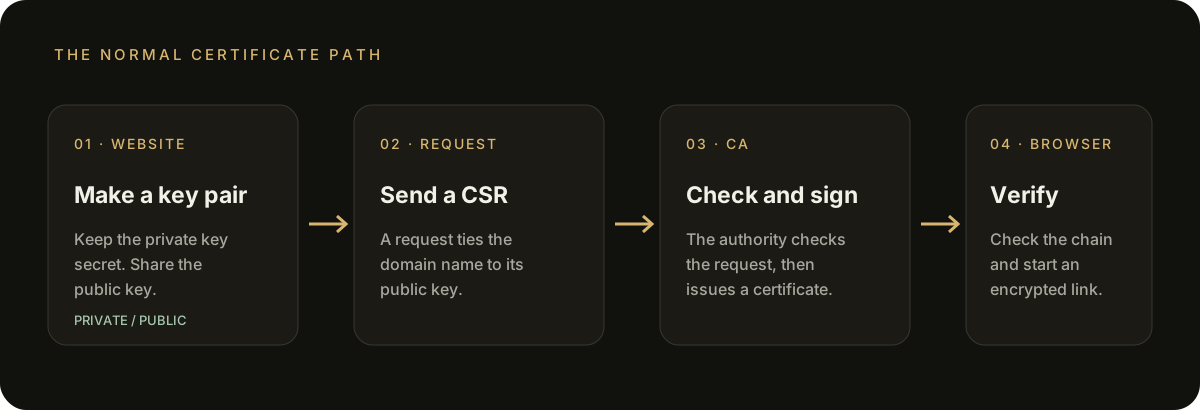
The usual path: a site makes keys, requests a certificate, a CA checks and signs it, and a browser verifies it.
What happened at eMudhra?
Researchers reported that the private keys for eight eMudhra intermediate CAs were cryptographically weak. Intermediate CAs issue certificates beneath a root CA. A weak intermediate key could let someone create certificates that appear valid for domains they do not control, on devices that still trust that CA.
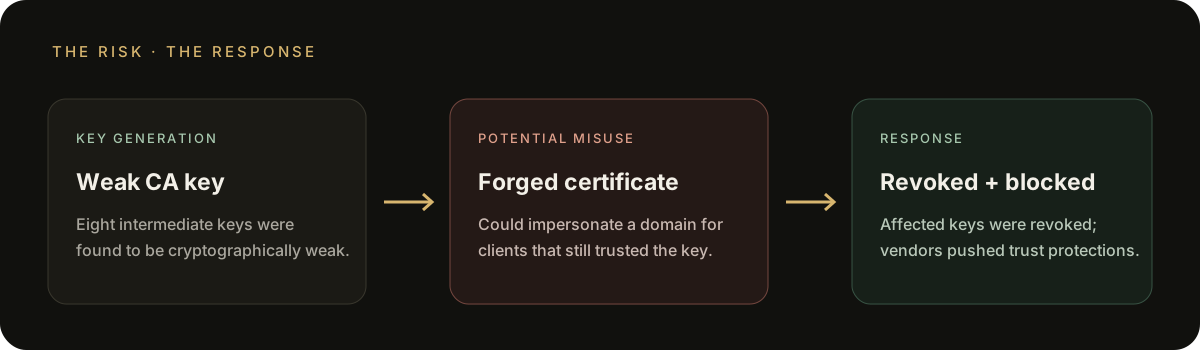
The risk was certificate forgery for clients that still trusted the affected keys. The response was revocation and blocking.

An animated accent showing the signal move from risk to response; the diagram above carries the full explanation on its own.
One important correction to the transcript
The transcript says the keys could be cracked after “256 iterations.” That phrasing is misleading. CERT-In says the affected P-384 private key values were smaller than 256 and could be recovered almost instantly. This was a key-generation failure, not a break in HTTPS encryption.
What is known about impact?
eMudhra says seven affected intermediates were never used in production; the one that was deployed issued no end-entity certificates. Google says Certificate Transparency checks found no TLS certificates from the six affected TLS intermediates before its blocking action. These are reported findings, not proof that every possible client or log was checked.
HTTPS is useful. It is not a legitimacy badge.
HTTPS helps protect data in transit and checks that a certificate matches the domain shown in the address bar. It does not prove that a site is honest, safe, or the real brand you intended to visit. A convincing lookalike site can also use HTTPS.
Think of it like a sealed envelope addressed to the place written on it: the seal protects the message on the way, but it does not tell you whether the address is the right one.
What should you do?
There is no special action most people need to take because of this incident. The main fixes happen in browsers and operating systems.
- Keep your browser and device updated. Updates carry the latest trust-store and certificate-blocking changes.
- Check the exact domain. Use a bookmark or type the address yourself for banking, email, and other sensitive services. Watch for misspellings and extra words.
- Stop at certificate warnings. Do not bypass them. Open the service through its official app or a known address instead.
- Use ordinary scam checks. Be cautious with unexpected downloads, urgent payment demands, and requests for passwords or one-time codes—even when the page shows HTTPS.
The incident concerned eMudhra’s public browser-trusted certificate infrastructure. CERT-In says India’s regulated digital-signature and eSign systems were separate and unaffected.
About the author
- 2nd Year IT Student | AI Agents • Open Source • DevOps • MLOps • Cloud Infrastructure | Building scalable, reliable systems.
Comments
Join the discussionNo comments yet. Be the first to comment.